Claude Code Setup Notes
Run this in the command prompt (not PowerShell):
curl -fsSL https://claude.ai/install.cmd -o install.cmd && install.cmd && del install.cmdThis message showed up:
⚠ Setup notes:
Native installation exists but C:\Users\user\.local\bin is not in your PATH. Add it by opening: System Properties → Environment Variables → Edit User PATH → New → Add the path above. Then restart your terminal
To run claude from the command, add the path above to the PATH environment variable.
Run claude. Then this shows up:
Claude Code can be used with your Claude subscription or billed based on API usage through your Console account.

Select login method:

 ❯ 1. Claude account with subscription · Pro, Max, Team, or Enterprise
   2. Anthropic Console account · API usage billing
   3. 3rd-party platform · Amazon Bedrock, Microsoft Foundry, or Vertex AI
It looks like we hit a paywall here.
Check out Claude Code Docs for Google Vertex AI.
Here we can probably hook up our Firestore database with Claude models.
Where to start to set it up - Claude Code Docs
Setup
This project requires a small amount of setup:
- In any project directory, run
npm run setup - This project uses Claude through the Anthropic API to generate UI components. If you want to fully test out the app, you will need to provide an API key to access the Anthropic API. This is optional. If no API key is provided, the app will still generate some static fake code.
- Here's how you can set the api key:
- Get an Anthropic API key at https://console.anthropic.com/
- Place your API key in the .env file.
- Start the project by running
npm run dev
The /init command
- Scans your codebase
- Creates a summary
- Writes the summary to the CLAUDE.md file
- This file is included in every request
- Helps find code faster
- Location where you can give Claude guidance
It wants to go through all subfolder (max depth 3?) to explore the codebase to understand its structure before creating CLAUDE.md file.
Well, this takes a while.
It then comes back with stuff like:
Created CLAUDE.md with the essential build commands and a concise architecture overview. Key points captured:

  - dotnet build / dotnet run / dotnet publish as the only needed commands
  - The four C# files and what each does
  - The wwwroot/docs/ pattern for adding documents (the core data flow)
  - No tests or linting to note
Multiple CLAUDE.md files:
- CLAUDE.md - guides Claude through your codebase, pointing out important commands, architecture, coding style; allows you to give Claude specific or custom directions; generated with
/init; submit this to source control - CLAUDE.local.md - not shared with other engineers; add personal instructions
- ~/.claude/CLAUDE.md - applied to all projects run locally
Custom Integration via GitHub Actions
If you want to build a specific tool (e.g., a custom documentation generator or a security scanner), you can call the Claude API directly within a standard GitHub Action.
Basic Implementation Steps: Store your API Key: Add your ANTHROPIC_API_KEY to Settings > Secrets and variables > Actions.
Create a Workflow: Use a simple shell script or Python action to send code snippets to Claude.
Example snippet for a custom Claude Action
jobs:
  claude_review:
    runs-on: ubuntu-latest
    steps:
      - uses: actions/checkout@v4
      - name: Ask Claude
        run: |
          curl https://api.anthropic.com/v1/messages \
            -H "x-api-key: ${{ ERROR }}" \
            -H "anthropic-version: 2023-06-01" \
            -H "content-type: application/json" \
            -d '{
              "model": "claude-3-5-sonnet-latest",
              "max_tokens": 1024,
              "messages": [{"role": "user", "content": "Review this code for security vulnerabilities."}]
            }'
Claude Code has:
- Planning mode
- Thinking modes
- Think
- Think more
- Think a lot
- Think longer
- Ultrathink
Location of the Github Claude app:
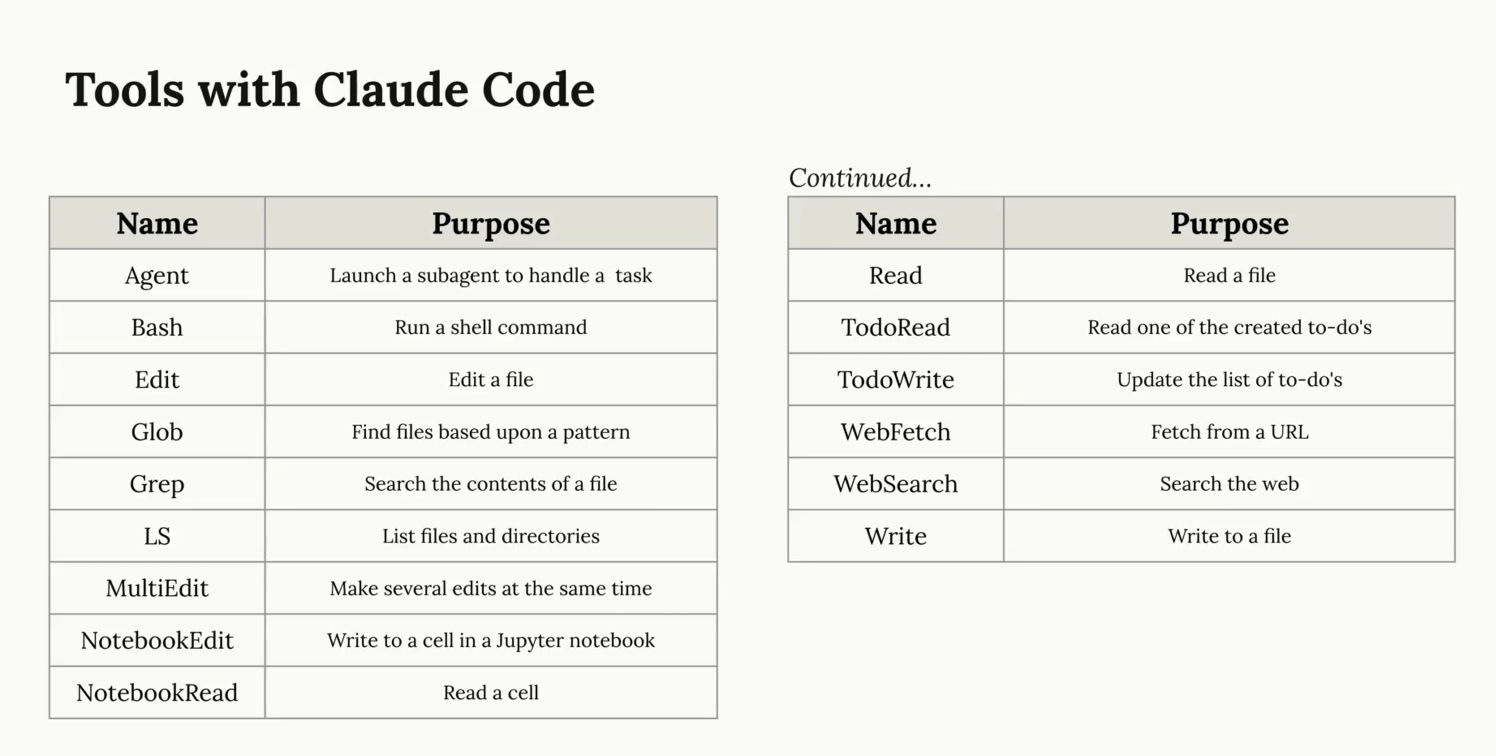
Tools with Claude Code
Controlling contenxt
- Escape
- Interrupt Claude, allowing you to redirect or correct it
- Fix issues with #memories
- Doube-tap Escape
- Rewind the conversation to an earlier point in time
- Allows you to maintain valuable context
/compact- Summarize the conversation and continue
- Helps Claude stay focused but remember what it has learned in the current session
/clear- Dumps current conversation history
- Useful when switching between different tasks
Custom commands
Forward slash brings up the custom commands menu, i.e. /add-dir, etc.
Also, create a folder called commands and drop .md files into it, for example:
Create a file called audit.md and add this text (skip the hyphens):
Your goal is to update any vulnerable dependencies.
Do the following:
- Run `npm audit' to fin dvulnerable installed packages in this project
- Run
npm audit fixto apply updates - Run test and verify the updates didn't break anything
Then restart claude code (claude command), then go to command and type in audit command. This will run your audit.md commands.
You can also pass arguments by having $ARGUMENTS in the first line of the markup file. The value is inserted at $arguments use.
MCP servers
MCP (model context protocol) servers are used for new tools and capabilities and are not used as APIs (data).
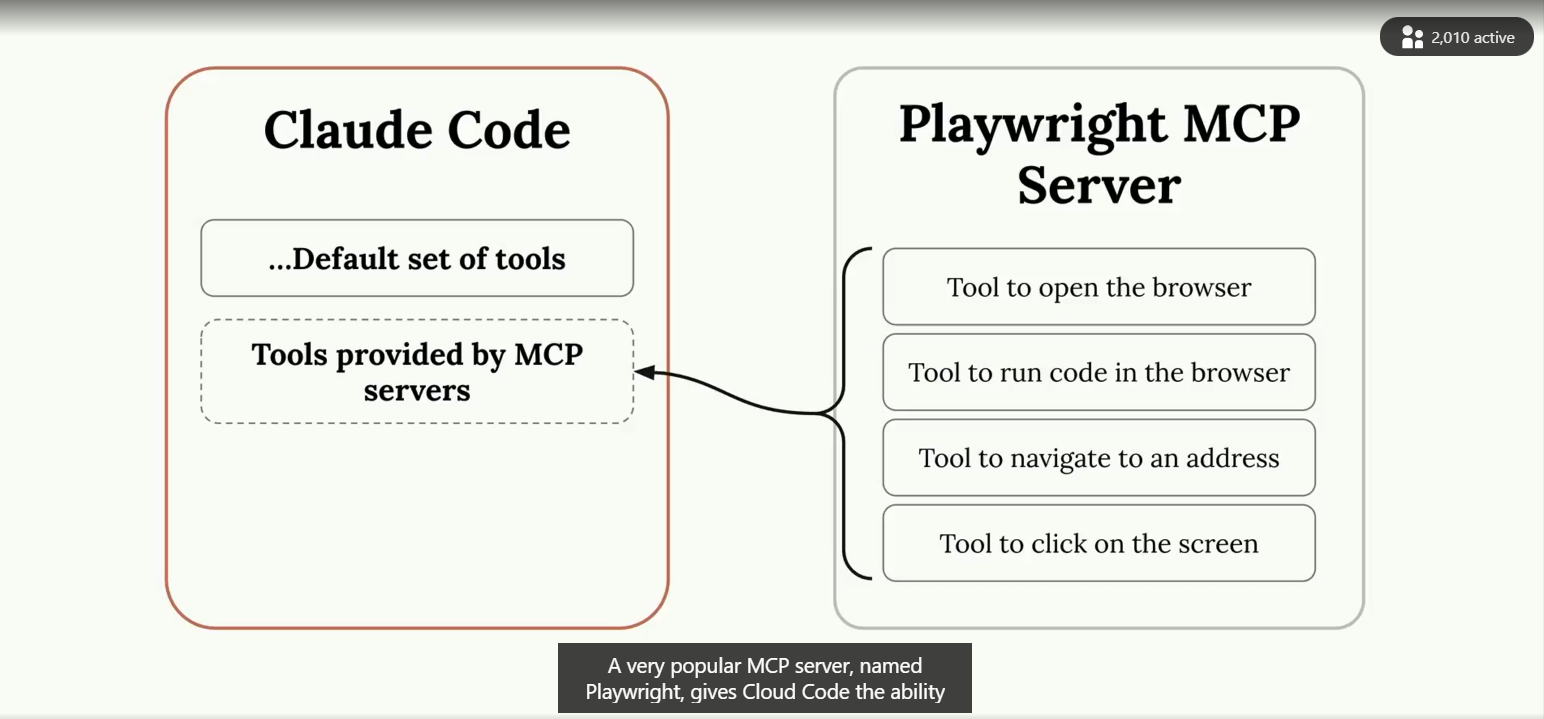
To add the MCP servers, use the command claude mcp add playwright npx @playwrithe/mcp@latest.
If you get any allow requests, add mcp__servername, i.e. mcp__playwright to the allow list in the .claude/settings.local.json.
Depending on the type of a project you're working on, there is probably an MCP server for it.
Github integration
Run /install-github-app and install the app.
Next, add the API key.
A pull request is automatically created with two actions: 1 - Adds @mention action support 2 - Adds pull request action support ()
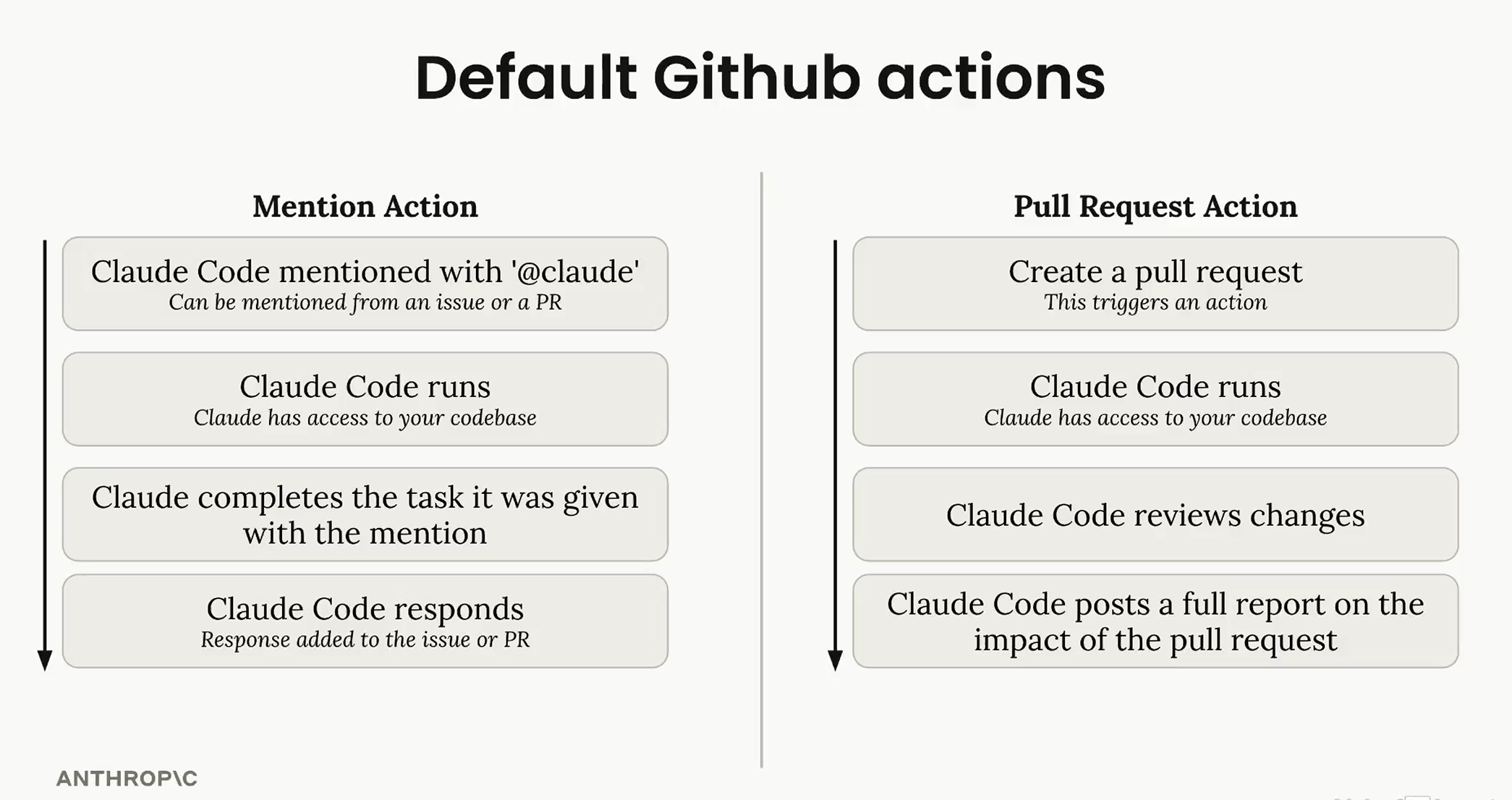
When running actions and calling Claude (using the yml file), you have to list each MCP server individually that you want to allow.
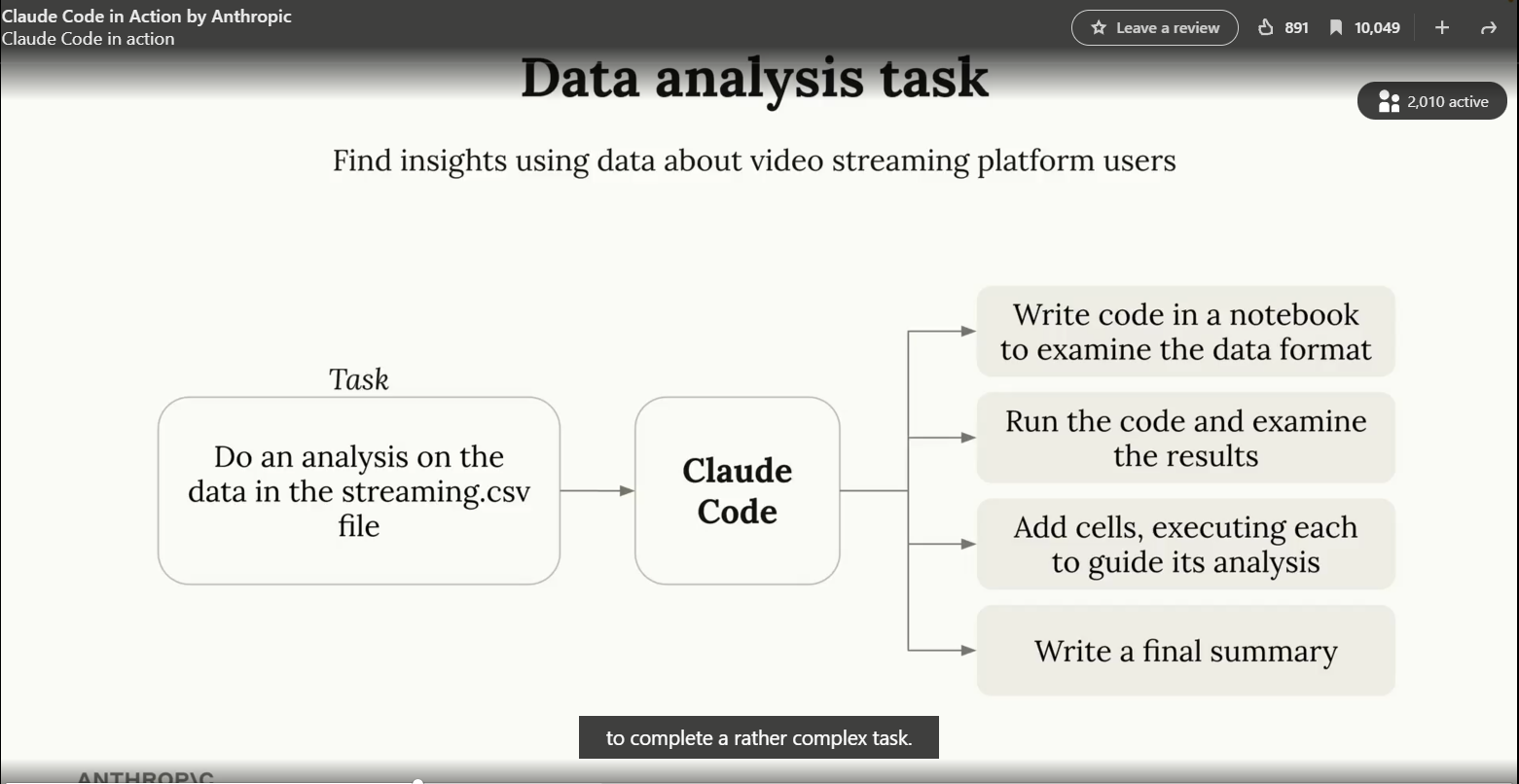
Sample task - data anlysis
Hooks
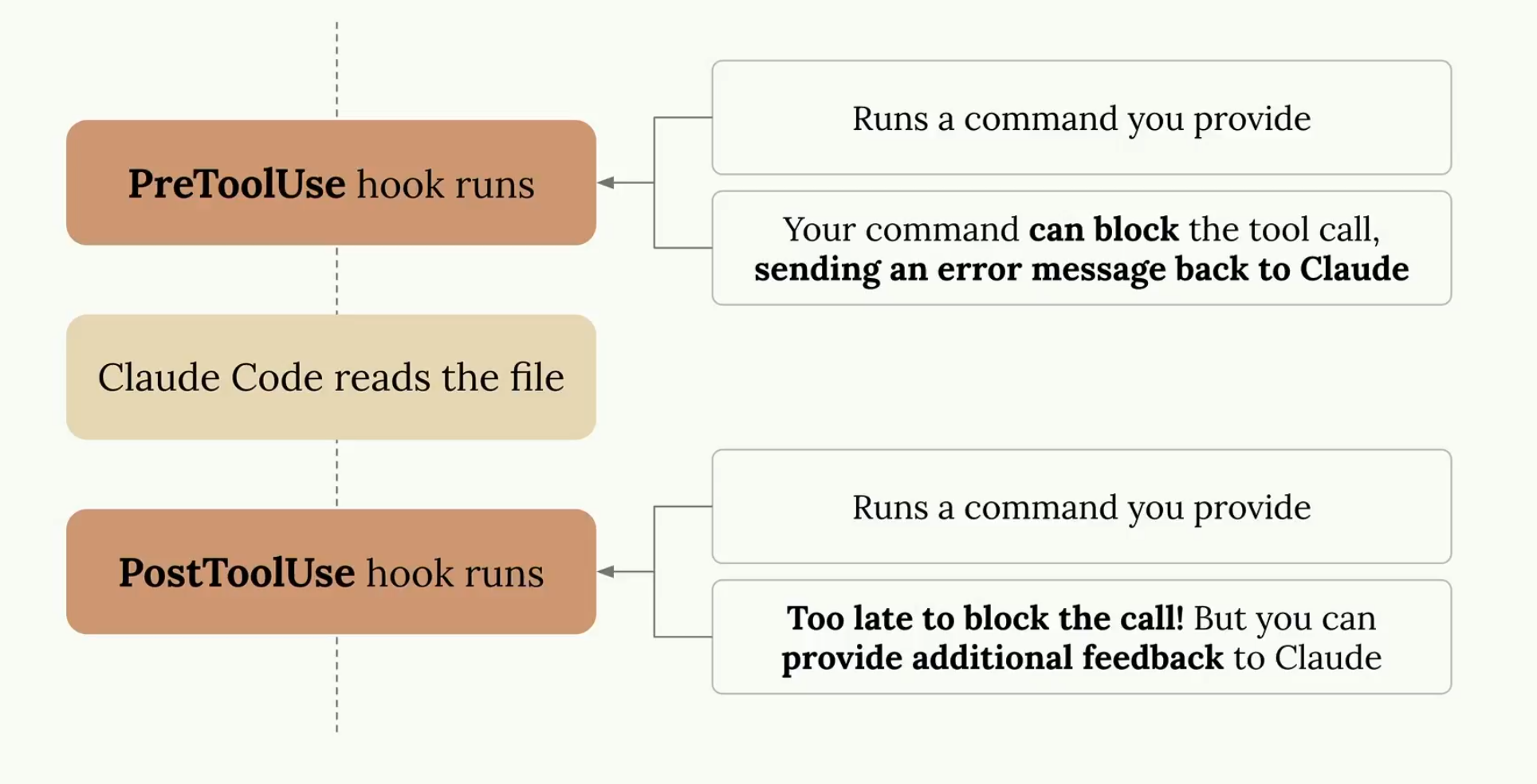
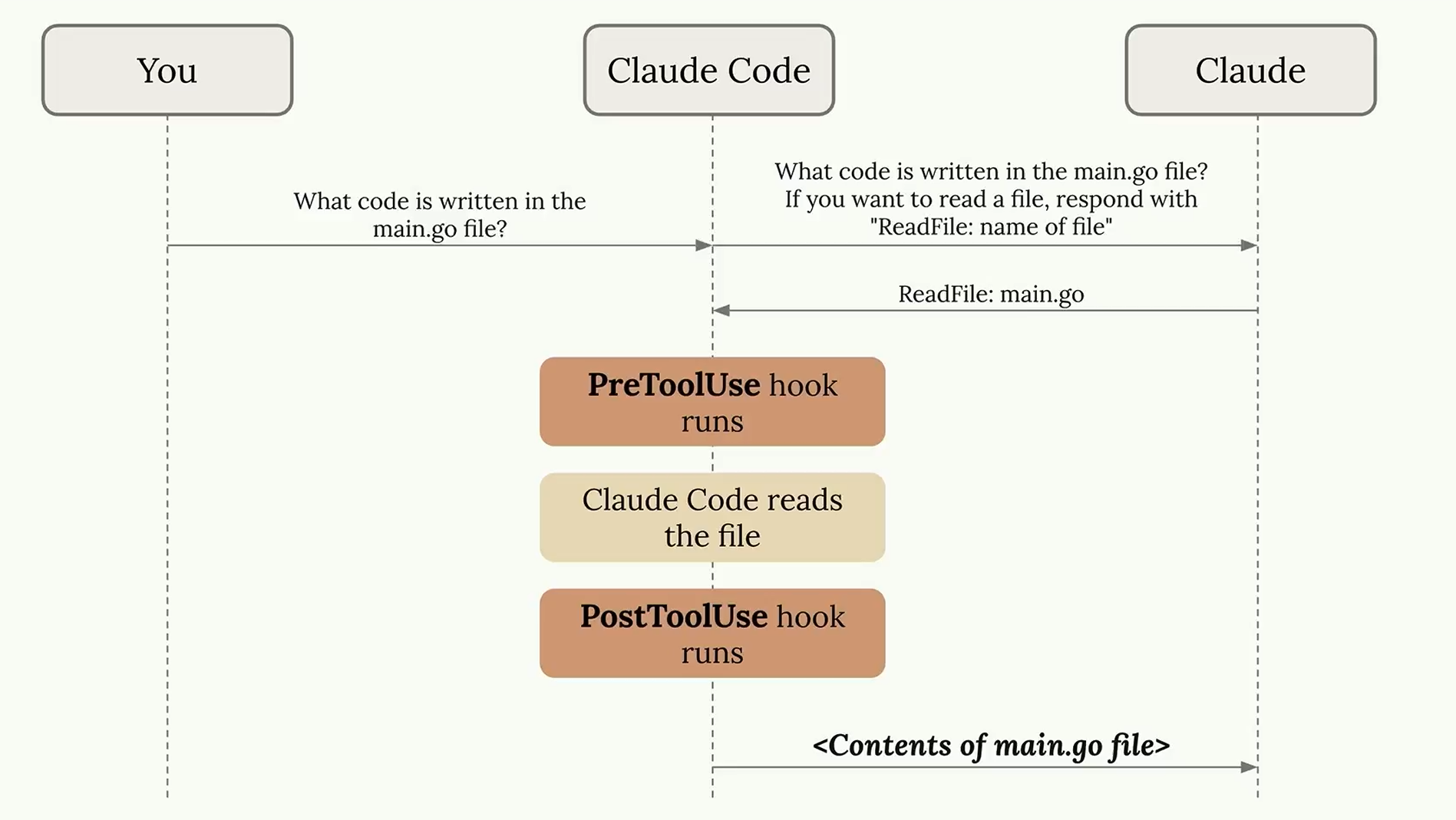
Automatic actions that run right prior to running Claude commands, or actions that run right after.
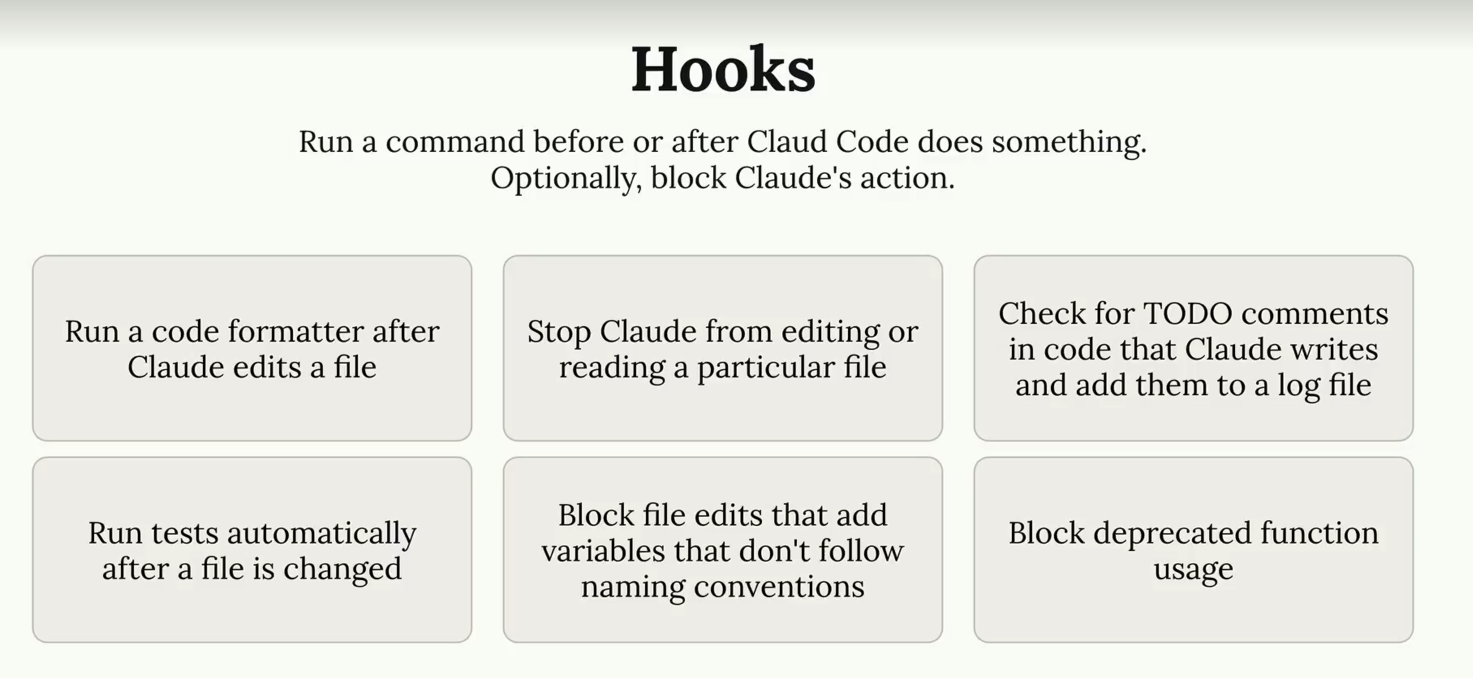
How hooks work
You can write hooks by going to /hooks:
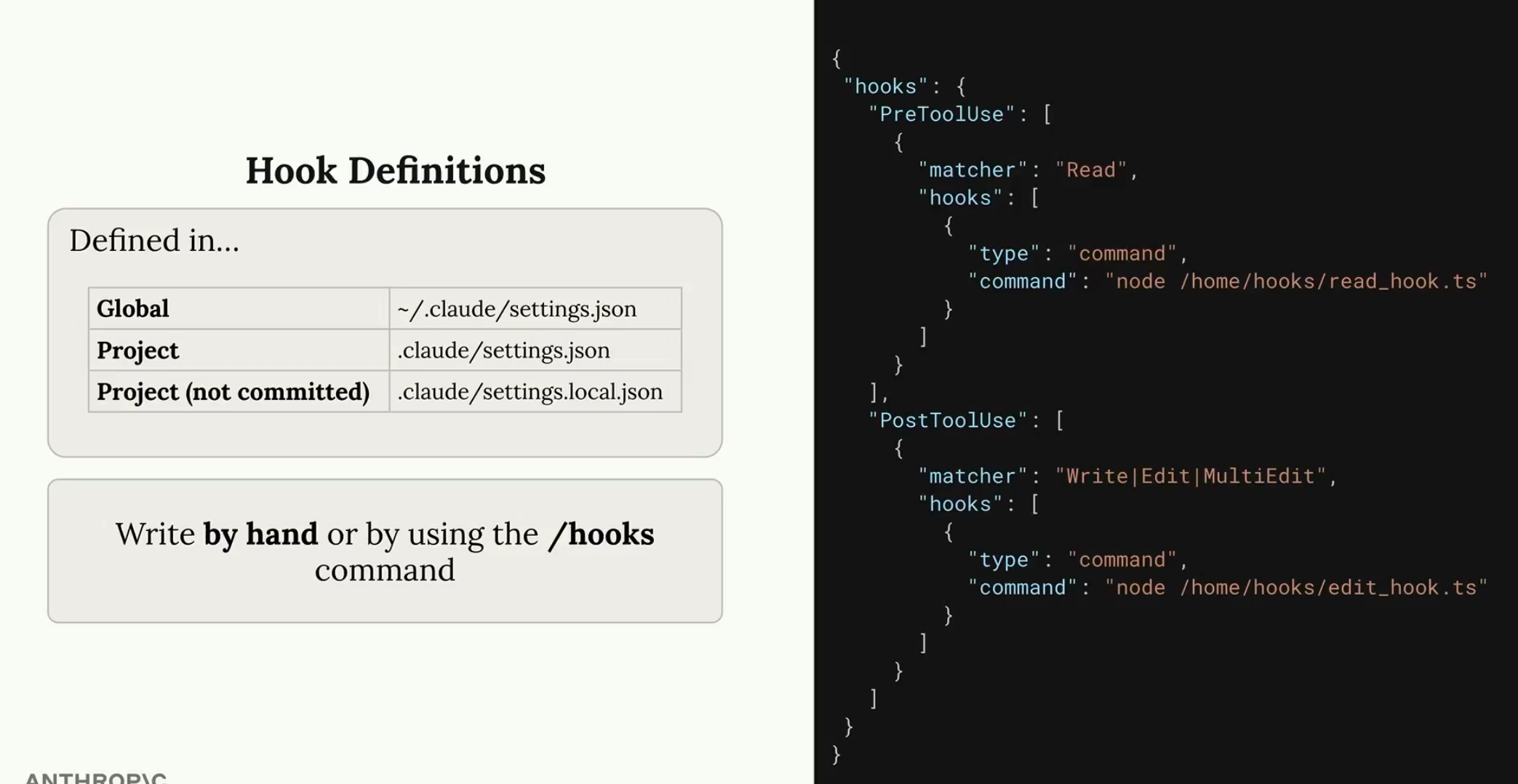
One more but last diagram on hooks; let's see how useful they are.